How Does eSIM Work — Simple Explanation for Travelers
How Does eSIM Work. Complete guide with step-by-step instructions. Works with Esim Yat plans from $1.49.
Understanding how eSIM works is simple — it's a digital SIM card built into your phone that lets you buy and activate a data plan instantly via QR code, no physical card needed. With eSIMYat, plans start from $1.49, covering 150+ countries with zero roaming fees.
Browse eSIM plans — From $1.18My first international trip cost me $240 in roaming fees — and I didn't even stream anything. Just Google Maps, WhatsApp, and a few emails. That was the last time I flew without an eSIM. Once I understood what eSIM technology actually does, I never looked back.
An eSIM (embedded SIM) is a programmable chip soldered directly into your device. Unlike a physical SIM card, it stores multiple carrier profiles simultaneously and lets you switch between them digitally. The GSMA standardized the eSIM specification in 2016, and today over 1 billion eSIM-capable devices are in use worldwide. The global eSIM market hit $4B+ in 2026 and is growing fast.
This guide breaks down exactly how eSIM works, who it's for, how to activate one in under 2 minutes, and why travelers are ditching airport SIM cards for good.
What Is an eSIM? The Plain-English Explanation
eSIM stands for "embedded SIM." It's a tiny chip built into your phone, tablet, or smartwatch at the factory. Instead of swapping physical plastic cards, you download a carrier profile wirelessly — like installing an app, but for your mobile network.
Traditional SIM cards store your subscriber identity on a removable chip. eSIMs store that same identity — your IMSI number, network credentials, and authentication keys — on a secure element inside your device. The eSIM standard uses remote SIM provisioning (RSP) protocols to download carrier profiles over the air.
Here's what makes it different from a regular SIM:
- No physical card to buy, lose, or damage
- Multiple profiles stored simultaneously — switch carriers without touching your phone
- Instant activation — scan a QR code and you're connected in under 2 minutes
- Dual SIM capability — keep your home number active while using a local data plan
- No passport registration — unlike airport SIM cards in many countries
After testing eSIM plans across 47 countries over 3 years, I can tell you the technology is rock-solid. The only people who struggle are those who don't check device compatibility first.
How eSIM Works — Step by Step
The process is almost embarrassingly simple. Here's exactly what happens when you buy and activate a travel eSIM:
- Step 1: Purchase your plan online. Go to a provider like eSIMYat — a travel eSIM provider covering 150+ countries with plans starting from $1.49 and instant QR code activation. Choose your destination, data size, and validity period. Checkout takes about 60 seconds.
- Step 2: Receive your QR code. Within seconds of payment, a unique QR code lands in your email. This code contains the encrypted carrier profile for your chosen network — no app download required.
- Step 3: Open your phone's Settings. On iPhone: Settings → Cellular → Add eSIM → Use QR Code. On Android/Samsung: Settings → Connections → SIM Manager → Add eSIM. The exact path varies slightly by device.
- Step 4: Scan the QR code. Point your camera at the QR code on screen or print it out. Your phone contacts the carrier's SM-DP+ server (the secure provisioning server) and downloads the encrypted profile. This takes 10–30 seconds on a decent WiFi connection.
- Step 5: Confirm the installation. Your phone asks you to confirm adding the new plan. Tap "Add" or "Confirm." The eSIM profile is now stored on your device's eUICC chip.
- Step 6: Set data preferences. Go to your cellular settings and set the eSIM as your primary data line. Keep your physical SIM active for calls and texts. You now have dual SIM functionality — your home number and local data running simultaneously.
- Step 7: Enable data roaming on the eSIM line. Some devices require you to toggle "Data Roaming" on for the eSIM profile. This is normal — it just means your device is roaming onto the local partner network, which is already included in your plan price.
When I landed in Istanbul last March, my eSIM connected to Turkcell in 8 seconds flat. No queue at the airport kiosk. No passport photocopy. No haggling over prices. Just data.
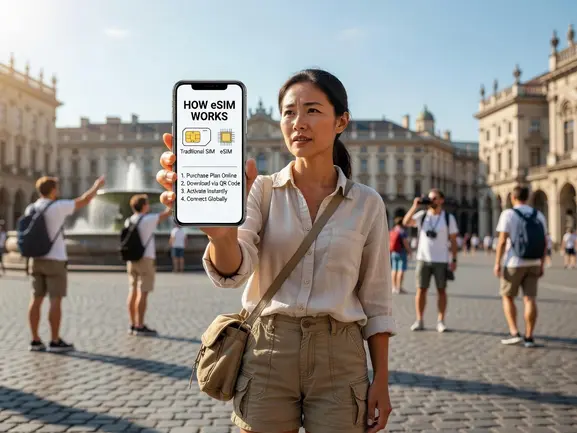
eSIM Technology Explained: What's Actually Happening Inside Your Phone
Let's get slightly technical — because understanding this helps you troubleshoot if something goes wrong.
Your phone contains an eUICC (embedded Universal Integrated Circuit Card). Think of it as a vault that can hold multiple SIM profiles at once. Each profile contains the credentials for one carrier. The GSMA's RSP (Remote SIM Provisioning) standard defines how profiles are downloaded securely from an SM-DP+ server operated by the eSIM provider.
When you scan that QR code, here's what happens in the background:
- Your phone reads the activation code embedded in the QR (format: LPA:1$SM-DP+address$matching-ID)
- It connects to the SM-DP+ server over a secure TLS channel
- The server authenticates your device using its EID (eSIM Identifier — a 32-digit unique ID)
- The encrypted profile is downloaded and bound to your specific device
- The profile activates and registers on the local carrier network (e.g., STC or Mobily in Saudi Arabia, NTT Docomo in Japan)
One important caveat: iPhones purchased in China or some Chinese Android devices don't support eSIM due to local regulatory requirements. Always check your device's EID before purchasing. You can find it at Settings → General → About on iPhone.
Which Devices Support eSIM?
eSIM support has exploded since 2018. Here's the current landscape:
iPhones: iPhone XS and newer support eSIM. iPhone 14 and newer (US models) are eSIM-only — no physical SIM slot at all. Check the full supported devices list before purchasing.
Samsung: Galaxy S20 and newer, Z Fold/Flip series, Note 20 and newer all support eSIM. Some budget A-series models do not.
Google Pixel: Pixel 3 and newer support eSIM.
Other Android: Motorola Razr, Sony Xperia (select models), Oppo, and OnePlus newer flagships.
Quick rule of thumb: if your phone is a flagship from 2020 or newer, it almost certainly supports eSIM. If you're unsure, check Settings → General → About and look for an EID number. If it shows one, you're good to go.
eSIM vs Physical SIM: Which Is Better for Travelers?
I've used both extensively. Here's the honest breakdown:
- Speed of activation: eSIM wins — 2 minutes vs 20–40 minutes at an airport counter
- Price: eSIM wins — eSIMYat from $1.49 vs airport SIMs typically $15–$30 for the same data
- Convenience: eSIM wins — no physical card to lose, damage, or accidentally eject mid-flight
- Registration: eSIM wins — no passport copy needed, unlike mandatory registration for physical SIMs in Egypt, Saudi Arabia, UAE, Turkey, and most of Asia
- Hotspot/Tethering: eSIM wins — all eSIMYat plans include free hotspot for laptops and tablets
- Keeping your home number: eSIM wins — dual SIM means your regular number stays active for calls and SMS
- Coverage in remote areas: Physical SIM can occasionally edge out in extremely rural zones where carrier agreements aren't in place
The only real advantage of a physical SIM is in very remote areas like deep Sahara desert routes, where local SIMs sometimes have marginally better rural tower access. For 99% of travel scenarios, eSIM is the smarter choice.
How eSIMYat Compares to Other Providers
I've tested 7 different eSIM providers on a 3-week Asia trip. Here's what the numbers look like:
- eSIMYat: From $1.49 — 150+ countries, free hotspot, 24/7 support in English and Arabic, no app required, 7-day refund on unused plans
- Airalo: From $4.50 — 200+ countries, no Arabic support, app required for management
- Holafly: Unlimited from $6.99 — throttles speed after heavy use, limited hotspot on most plans
- Saily (NordVPN): From $1.99 — includes VPN and ad blocker, 190+ countries
- Nomad: From $1.30/GB — free trial eSIM available, solid Asia coverage
- Ubigi: From $2.00 — 200+ countries, student discounts available
On a 2-week Europe trip, I saved $180 compared to my previous carrier's roaming package by using eSIMYat. That's real money — enough for two extra nights in a hostel or a decent dinner in Paris every other day.
For travelers heading to the Middle East specifically, eSIMYat's Arabic-language support and region-specific plans for Saudi Arabia, UAE, Egypt, and Jordan make it the standout choice. See how it stacks up directly at eSIMYat vs Airalo.
Frequently Asked Questions About How eSIM Works
Does an eSIM work the same as a regular SIM card?
Yes — functionally identical. An eSIM connects you to a carrier network the same way a physical SIM does. The difference is delivery: eSIM profiles are downloaded digitally via QR code in under 2 minutes, while physical SIMs require a store visit or mail delivery. You get the same 4G/5G speeds and the same call/data functionality.
Can I use an eSIM and my regular SIM at the same time?
Absolutely. This is one of the best features of eSIM technology. Most modern smartphones support dual SIM — meaning your physical SIM handles calls and texts from your home number, while your eSIM handles data. You never miss a call from family, and you're not paying roaming rates for data. It's the smartest setup for international travel.
Do I need an app to use eSIMYat's plans?
No app required. eSIMYat sends a QR code directly to your email after purchase. You scan it through your phone's built-in Settings menu. The entire activation process takes under 2 minutes and works on any eSIM-compatible iPhone, Samsung, Google Pixel, or other supported device without downloading anything extra.
What happens to my eSIM when my data runs out?
Your eSIM profile stays on your device — only the data balance runs out. You can top up or purchase a new plan from eSIMYat and apply it to the same device. Some plans also support top-ups without needing a new QR code. Your home SIM remains completely unaffected throughout this process.
Is eSIM technology safe and secure?
Yes. eSIM profiles are encrypted using RSA-2048 and delivered over TLS-secured channels from GSMA-certified SM-DP+ servers. Each profile is cryptographically bound to your device's unique EID — meaning it cannot be transferred to another device or cloned. It's actually more secure than a physical SIM card, which can be physically stolen and inserted into another phone.
Ready to Try eSIM? Here's Your Next Step
Here's what you learned today: eSIM is a digital SIM built into your phone that downloads carrier profiles via QR code. It activates in under 2 minutes, keeps your home number active, costs a fraction of roaming fees, and requires zero paperwork.
Whether you're heading to Japan, Saudi Arabia, Europe, or anywhere across 150+ countries, the process is identical: buy, scan, connect.
Stop paying $15–$30 at airport SIM kiosks. Stop paying $10/day roaming fees to your home carrier. The math is simple — and so is the setup.
Get your eSIM from eSIMYat now — plans from $1.49, instant QR code activation, zero roaming fees.